Service workers
Service Workers
what are service workers?
Standard Javascript files
- Javascript files loaded by html pages are the Javascript Runtime, and they are on a single thread (the inline/external files)
- they can access the DOM
- react, angular, stuff (javascript as you know it)
Service Workers
- runs on a separate single thread
- decoupled from html pages (you register them from your html pages, but then it lives in a separate scope)
- has their own scope that is defined by manifest.json, meaning they can manage ALL pages within the scope (e.g. all pages of the domain/app)
- live on after the pages have been closed
- can't access the DOM
service workers are background processes (in phones/OSes)
- since they run in the background, they are really good at one thing: REACTING TO EVENTS (which is kinda what a lot of standard js is used for)
- service workers are ALL ABOUT EVENTS
what events can service workers listen to?
- Fetch
- loading an image in html, or using Fetch API from javascript
- you don't trigger a fetch when using an Ajax or XmlHttpRequest (XHR) (so JQuery Ajax requests don't trigger a Fetch event)
- since most requests go through the service worker, you can block them or manipulate them, or return cached assets
- Push Notifications
- every browser (Chrome, Mozilla etc) have their own Push Notification servers. service workers can listen to packets received from those servers and notify the client (user).
- why not normal js? cause service workers are background processes
- service workers can REACT to the push notifications
- Notification Interaction
- you can react to user interaction with notifications
- the service worker is always running, so is ready to react to user interaction, whereas the webapp is not always open
- Background Sync
- weak connections
- user executes an action (e.g. post a picture)
- if there is no connection, the background sync allows the sevric worker to store the action
- and execute it when there is a connection
- how? it listens to a Background Sync Event (e.g. internet connection is restored)
- why, again, perform this in the service worker instead of standard JS? because you can perform the syncing even after the user has turned off the app.
- Service Worker Lifecycle
- hook into these lifecycle phases and do stuff when the service worker lifecycle events are called.
The Service Worker Lifecycle
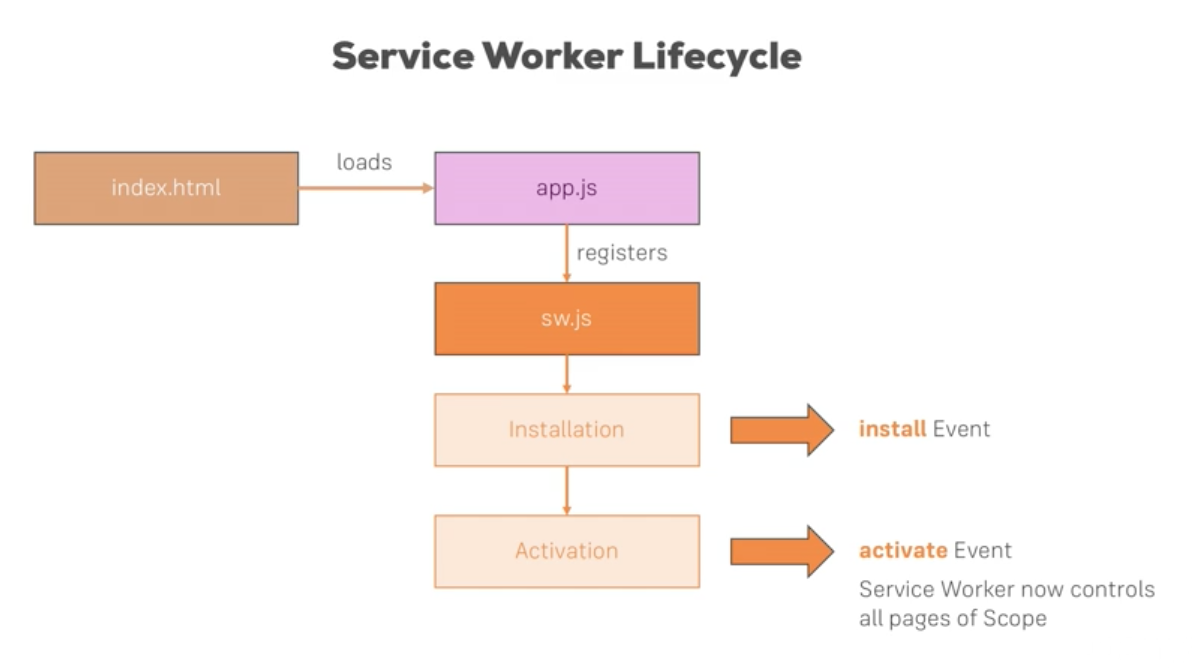
index.html --loads--> app.js --registers--> sw.js --> install Event of the service worker --> activate Event of the service worker
- index.html
- first point of contact for the browser/app
- app.js
- loaded from index.html (standard javascript)
- has code inside that registers the service worker sw.js
- this tells the browser that sw.js is javascript but NOT to be executed right now, and to register it as a separate background process.
this below will be in app.js (for a firebase deploy), see short_version notes
<!-- firebase part, copy pasted from console-->
    <script src="https://www.gstatic.com/firebasejs/4.12.1/firebase.js"></script>
    <script>
    // Initialize Firebase
    var config = {
        apiKey: "AIzaSyDryHHDNLsAV3JI2m8v2kYz0XifUHeAipQ",
        authDomain: "mypwa-583da.firebaseapp.com",
        databaseURL: "https://mypwa-583da.firebaseio.com",
        projectId: "mypwa-583da",
        storageBucket: "mypwa-583da.appspot.com",
        messagingSenderId: "340354538395"
    };
    firebase.initializeApp(config);
    </script>

    <!-- this is the service worker
    points so the service worker js file called sw.js -->
    <script>
        if('serviceWorker' in navigator) {
            navigator.serviceWorker.register('/sw.js').then(function() {
                console.log('Service Worker Registered')
            });
        }
</script>- sw.js
- own javascript file
- two phases to activate
- installation
- emits an
installEvent that can be hooked into to execute some code (e.g. caching some assets)
- emits an
- activation
- will be activated once there is no older instance of a service worker running
- older service workers will exist when there is still a previous version of a webapp running
- the browser will not switch service workers (of the same app) until it is sure the previous service worker is not actively communicating with the webapp.
- when it can be activated, the sw will emit an
activateEvent. - the Service Worker now controls all pages of its Scope.
- idle
- once started up, it will idle until something happens
- terminated
- after a certain amount of time (set by different browser implementations), it will
Sleep. - it will wake up automatically as soon as events come in. (so the browser is the one listening to the Events, and they will wake the Service Worker up when somehting is happening).
- after a certain amount of time (set by different browser implementations), it will
- one important thing. when you reopen the webapp, the
register service workercode is still run, but the browser will not install a new service worker unless 1 or more bytes have changed. so the browser effectively does its own diffing to see if the service worker needs to be changed.
installed but not activated
- if your page is open (the app), the new service worker will be installed BUT NOT ACTIVATED (you can see it in devtools under service workers, saying 'waiting to activate')
- it is because when the app is open, it might still be actively communicating with the service worker, and switching to a newer service worker might introduce breaking changes