Pwa (progressive web apps)
PWA (Progressive Web Apps)
related to others
ref links to check for updatedness of PWAs over all devices and services
- caniuse
- full docs for manifest.json
- manifest.json intro by google
- install banners (chrome) (the important part that makes things accessible like a native app)
kinda buzzwordy now
- perhaps use with firebase?
doesn't work on all devices
- 100% on chrome 65
- super new on safari
link2 - support older webapp safari implementations with
<meta name="apple-mobile-web-app-capable" content="yes">- and the rest through docs - if you are adding fallback options (for ios safari
apple-mobile-web-app-*or for internet explorer) in html, you have to do it MANUALLY FOR ALL HTML FILES YOU USE.- difference between new and old methods are
- new: add
manifest.json, edit that file to setup the app - old: add
<meta>andlinktags inline in html, copy paste them to all other htmls.
- new: add
- difference between new and old methods are
important things to know
- PWA is a set of features that together make a native-ish app experience
- not only responsive, but also with:
it is "progressive", so i don't need to implement everything to call it PWA
- progressively enhance web applications to look and feel like native apps
3 main things
- Be Reliable - fast and has offline functionality
- Fast - respond quickly to user actions
- Engaging - get the users back into the app (push notifications)
couldn't you do the same thing with native mobile technologies?
why native apps
- push notifications bring users back
- home screne icons make access easy
- access to native device features like camera, gps, others
- possible to work offline
(what other things can be used to bring users back voluntarily?)
why not native apps
- multiple languages, multiple tech teams to maintain
- difficult to get user to install (so they rarely)
traditional web apps
- high reach, easy to access (no installation)
progressive web apps
- access to device features, leverage OS speed ups
- also high reach, easy to access (no installation)
core building blocks of PWAs
- service workers
kinda like pasting your javascript code onto other people's PCs and being able to access their stuff
- supported in modern browsers
- basically a background process running js (a bit like your own little box of that previously
webapis have (for stuff likesetTimeout)) - allows you to do caching / offline support (just ask the code to provide some offline version or offline interactivity)
examples:
- Background Sync
- Web Push Notifications
- Application Manifest
- makes it installable on homescreens
- actually kinda like a settings file like
package.json
- Responsive Design
- looking good across devices
- APIs
- Geolocation API
- Media API (Camera)
SPAs vs PWAs
Single Page Applications (SPAs)
- a single html file, and JS is used to create and manipulate the DOM tree to build and rebuild stuff (which i think i really like)
- powered by Javascript
- highly reactive to user input
- only one html file sent to browser
Multi-page Applications
- the normal stuff
Progressive Web Apps (PWAs)
- is a CONCEPT encompassing a set of features
- doesn't really compare directly with SPAs or Multi-page. you can make an SPA a progresive web app.
- uses a lot of Javascript, but can even work without it
- doesn't need any frameworks to work
- aims to be highly Reactive, but mainly focuses on initial loading time
- can work with multiple files too
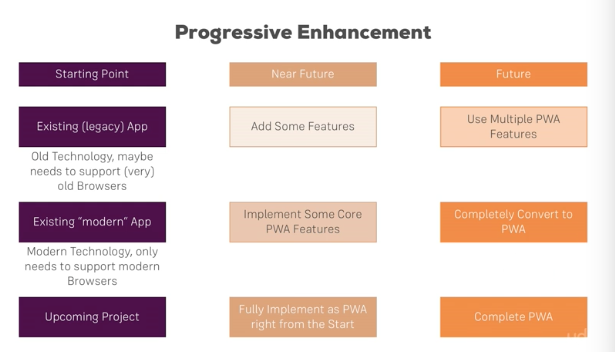
what is Progressive Enhancement
- it basically means we can progressively enhance our application
- slowly add bits onto existing (or plan from the beginning) applications to make it have better and better features
how does it fit into different types of projects?
1. manifest.json
- settings file for your app
- more
criteria for the 'add to homescreen' to work
2. service workers
- js files that are allowed to work on other people's (users) computers and mobile phones
- they (probably) live outside the Javascript Runtime (v8 chrome) and somewhere together with the WEBAPIs. in fact, they might just be working like a developer-customizable WEBAPI.
- the video understanding web apis and event loops and the awesome event loop ide 'loupe'
- more