Javascript
JAVASCRIPT
various MVC frameworks in javascript for comparison
BABEL REPL compiles everything into the final state (before serving), use it to check for everything
TODO: learn a lot of javascript
- f8 app tutorial > react > jsx > react native
- short javascript tutorial https://medium.com/codingthesmartway-com-blog/pure-javascript-building-a-real-world-application-from-scratch-5213591cfcd6
- learn react and gulp through an app with flask
- PWA with async/await
- read
the bits that make javascript work
3(++) ways to run javascript (together with html+css)
- internal (synchronous loading) - script is between <script></script> tags
- external (synchronous loading) - script is separate file but
browserify-ed to magically appear in between <script></script> tags - external (asynchronous loading) - script is separate file, uses module loading
examples in ./code/js-runtime-methods/
1. internal synchronous
1x html file
html file runs with javascript inside within the <script></script> tags
- inline javascript
- single request (to the server)
- libraries can be run from
npmusingunpkg(i think the package needs to have a js file particularly for this usage because npm seems to just load that file from npm into inline) - *use
<script>//javascript here</script>inside your html and type javascript stuff in there - *has no
require("someLibrary");when you do inline js
2. external synchronous
1x html file, 1x js file
html file runs, calling the (browserified) app.js file
source code transformation — either ahead of time (webpack and browserify) or at runtime (nodular)- multiple requests (because its multiple files to call)
- the resultant javascript is injected into the html and run as if it is a single html file (after joining it together through multiple requests)
- *if not using external libraries, then just point to your
app.jsfile. - *if using external libraries (through node) to use
require("someLibrary")(which is actually a node.js method), run browserify on it. source - example
how?
Browserify parses the AST for require() calls to traverse the entire dependency graph of your project.
- this is because you don't use node.js to run it, but rather you run the entire html (and js with the node-specific methods) through the web browser.
3. external asynchronous
1x html file, 2x js file
javascript (node) starts a server through node server.js, which serves the html file, which calls the (browserified) client.js file
(run the .js (something like node server.js and the html is served at some port))
- running a server + source code transformation
- multiple requests (because its multiple files to call)
server side
- flask as server ===
node app.js - flask/node runs the .py/.js file which generates or calls the .html file and displays it
- opens a port and listens
client side
++
this is hard. what are its uses?? A: this dude says so below
You do not "need" to load javascript files asynchronously or via some custom loader. Here are some reasons when asynchronous loading or custom loading might provide a benefit:
When the javascript file is not normally needed and you might want to load it upon demand rather than all the time
When the javascript file is not needed for initial page display and you want to maximize the speed of first display for your page
When you want to control the timing of exactly when the javascript file is loaded
When you are deciding, based upon some condition, whether to load the javascript file or not (for example, if loading from a CDN failed, you might load from a backup location)
When you want script loading to proceed in parallel with other things rather than serialized one after another
If you don't need any of these benefits or some other benefit provided by programmatic loading, then you can just use the normal <script> tags and let them load synchronously.
all-in-one
comparisons between internal and external js
- when to use which
- another comparison
- and another
- if
document.getElementById("someTag")doesn't work - window vs document (in javascript)
understanding asynchronous function calls
when people say, 'don't block the event loop', they mean 'don't put shitty slow code on the stack, because the browser can't do what it needs to do, which is update its frames to be a fluid ui'.
Wha?
read the following topic then.
how does Javascript work? (event loops)
the video the awesome event loop ide 'loupe'
a single-threaded non-blocking asynchronous concurrent language has a call stack, an event loop, a callback queue, some other apis
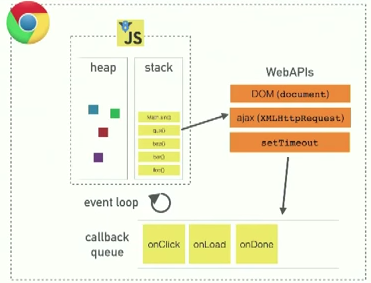
- the above is what the chrome v8 engine looks like
- in node, almost everything is the same (except instead of WebAPIs it is all C++ APIs)
javascript is a single threaded programming language
the call stack
- one thread === one call stack === one thing at a time
- add to and take away from one 'order' at a time
- Javascript can only do one thing at a time

blocking
- code that is 'blocking' the stack from running fast
- no formal definition of what is blocking, it's just code that is slow
- this behaviour happens in single threaded languages like Ruby (just gotta wait till it's done)
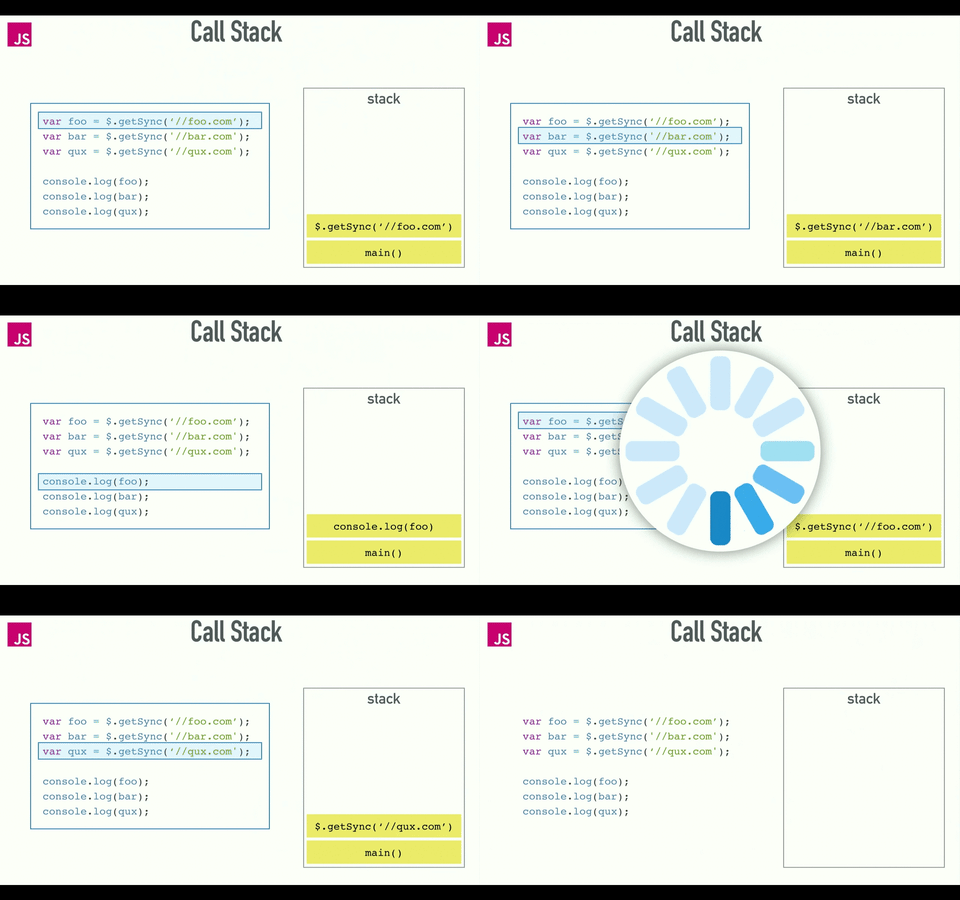
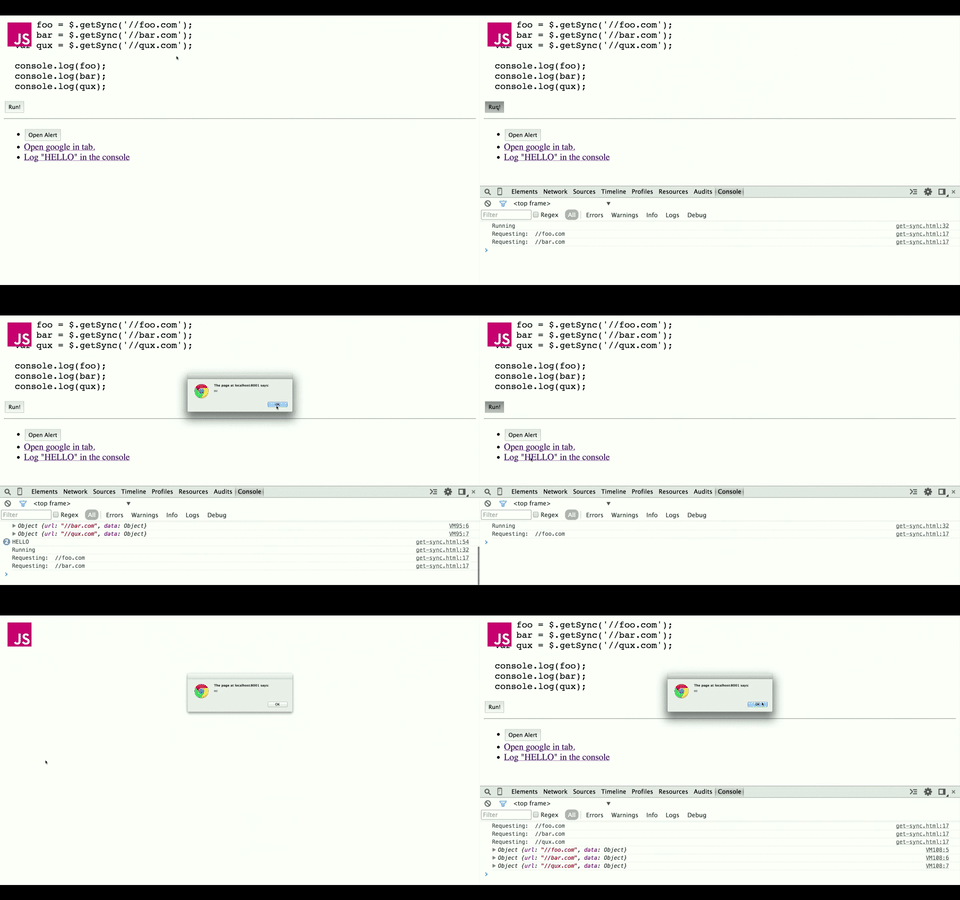
solution to blocking : asynchronous callbacks
call me ... maybe?
- the call stack run the code in sequence, but the asynchronous function magically vanishes, allowing you to run the next bit of code, until the async process finishes and returns something after that.
- how?
with concurrency & and event loop
one thing at a time. except not really.
- so Javascript can actually do more than one thing at a time
- Javascript Runtime can only do one thing at a time. :P
- but the browser is more than just Javascript Runtime.
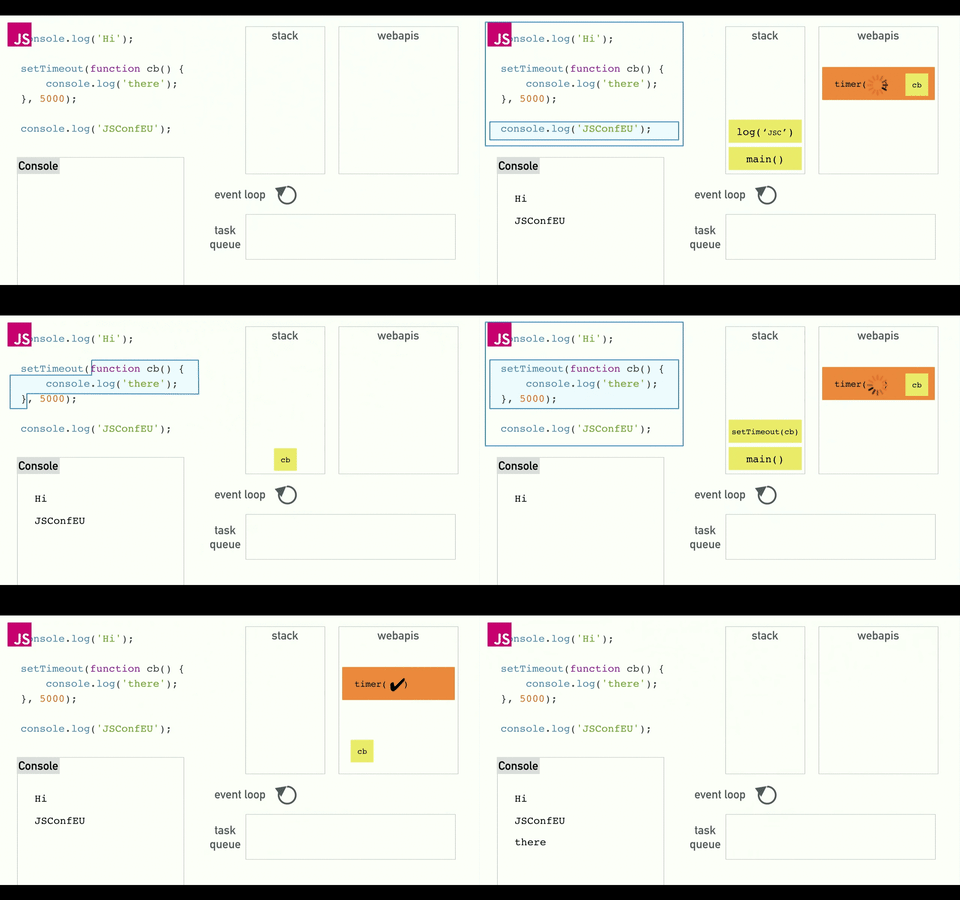
it's a bit chaotic, so let's break it down piece by piece
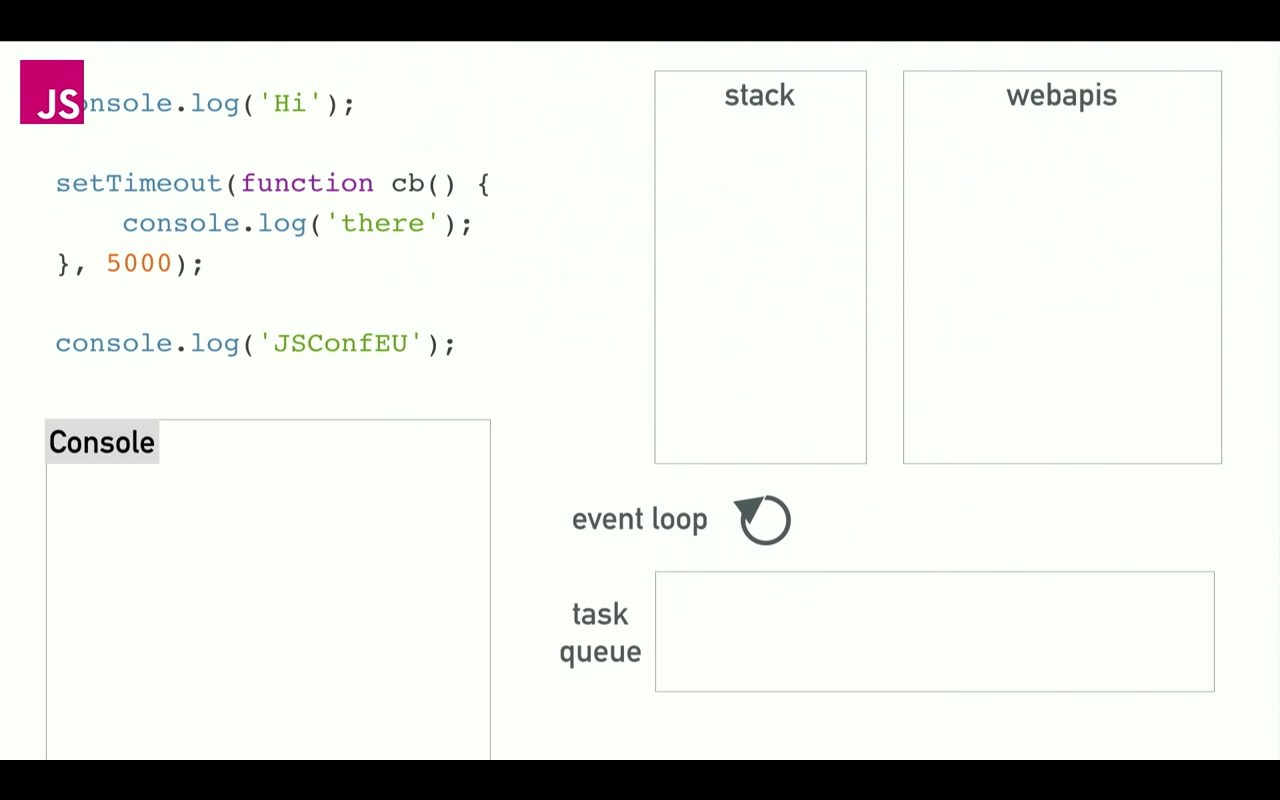
stack is call stack - essentially 'javascript land', webapis, task queue and event loop are hidden from us but lives in the browser / nodejs runtime environment.
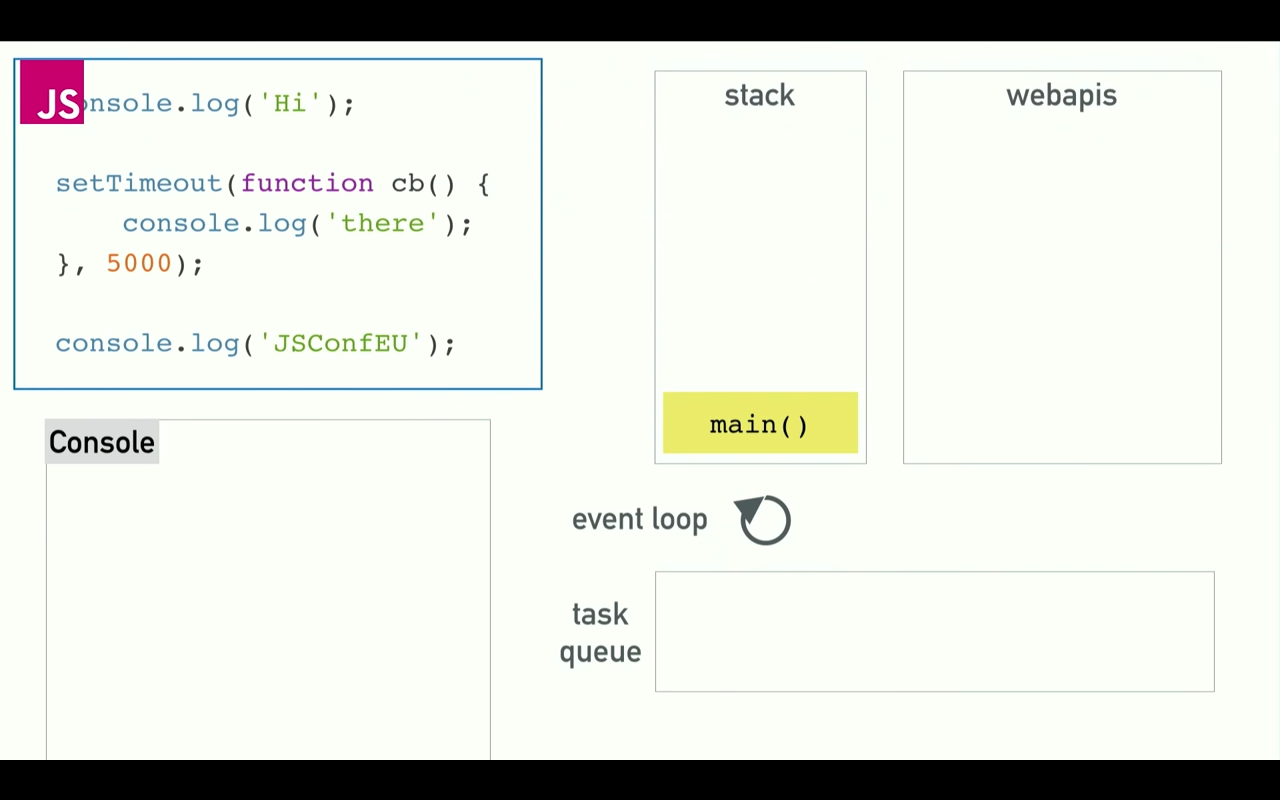
the main() process starts (Javascript starts running)
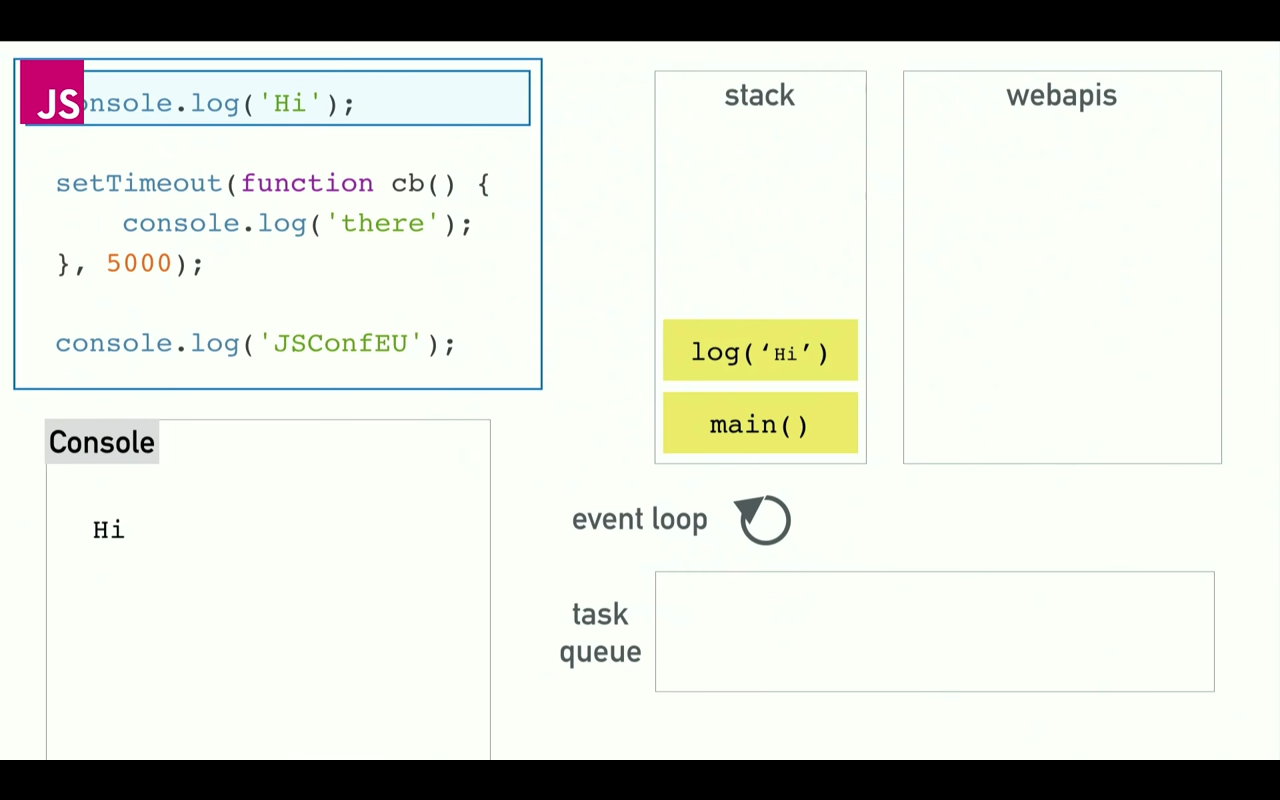
the call stack (also called Javascript Runtime) steps through the code from top to bottom, performing the console.log('Hi'); task. hee you can see it in the call stack.
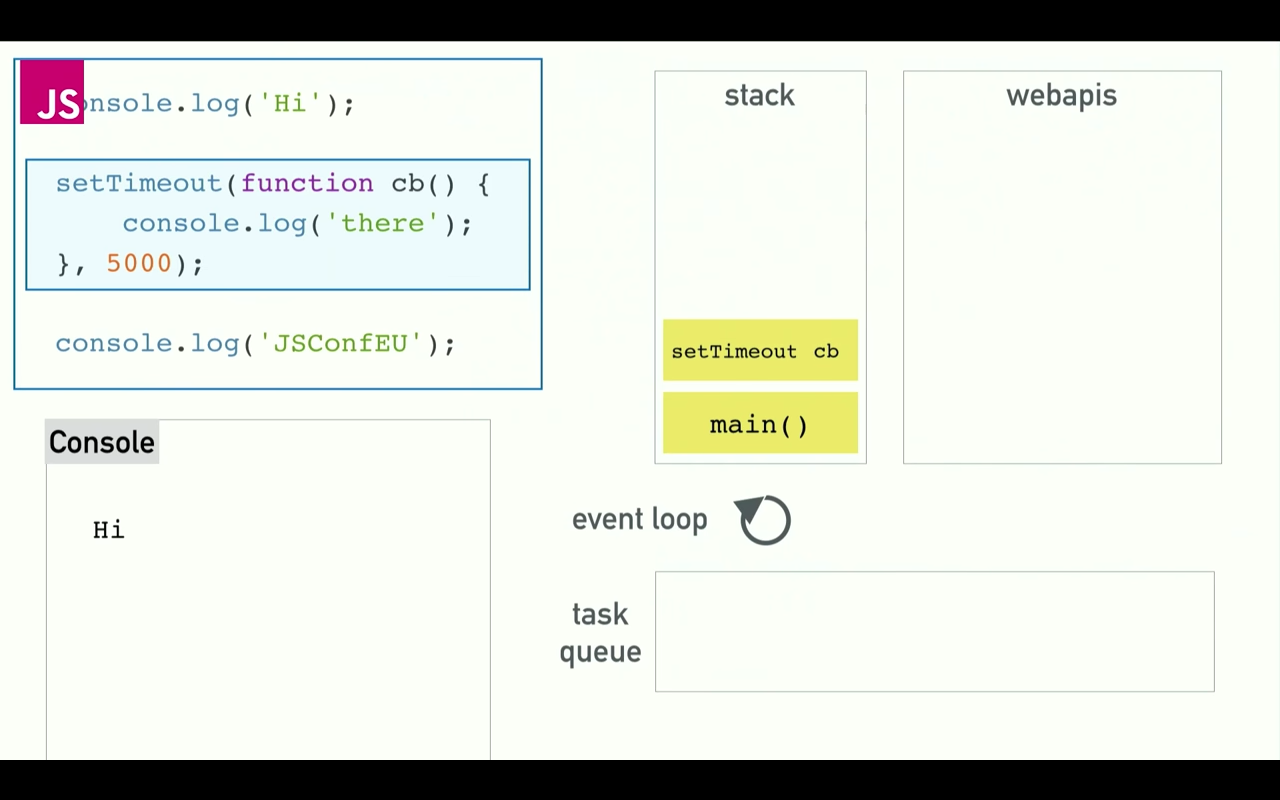
here we run into out asynchronous function. the setTimeout function gets pushed onto the call stack and executed.
- note that setTimeout doesn't exist in the
call stack(and by extension the chrome v8 engine), but is given to JS Runtime by thewebapispart of the Chrome / Nodejs environment.
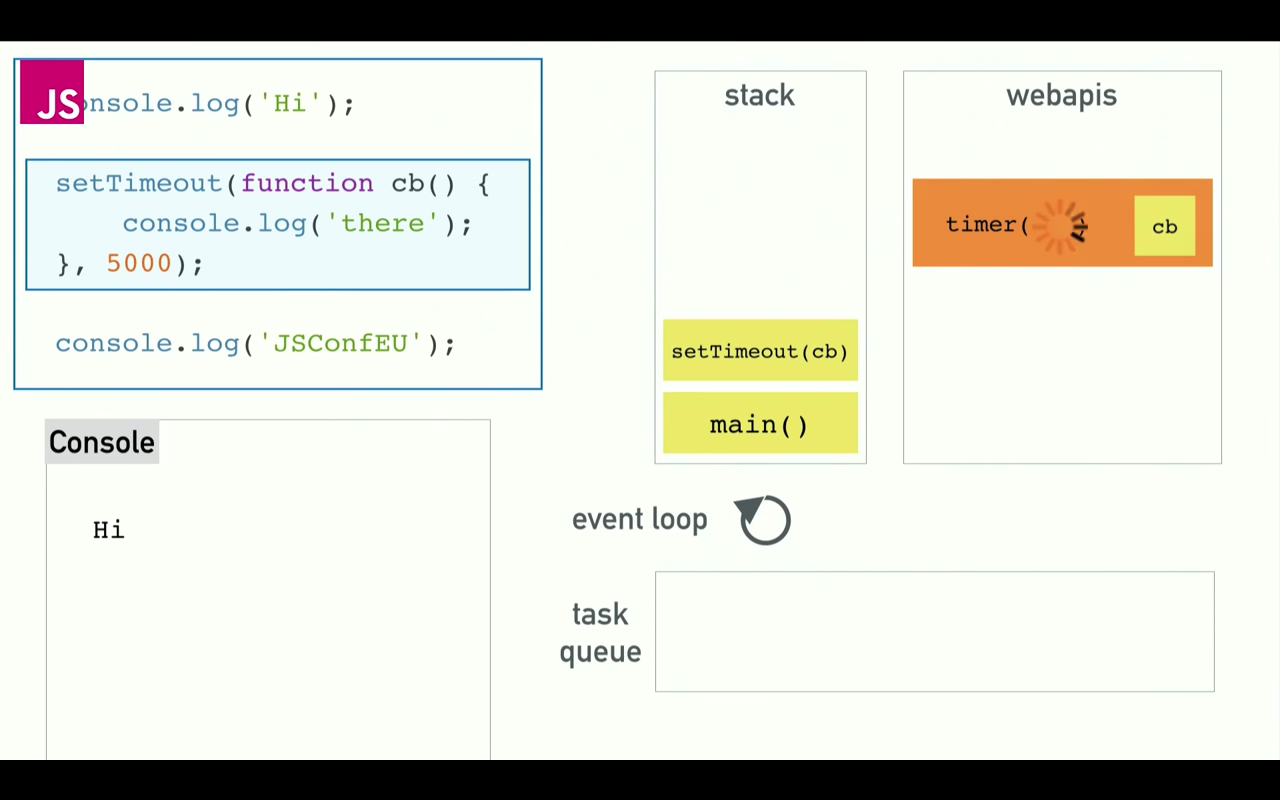
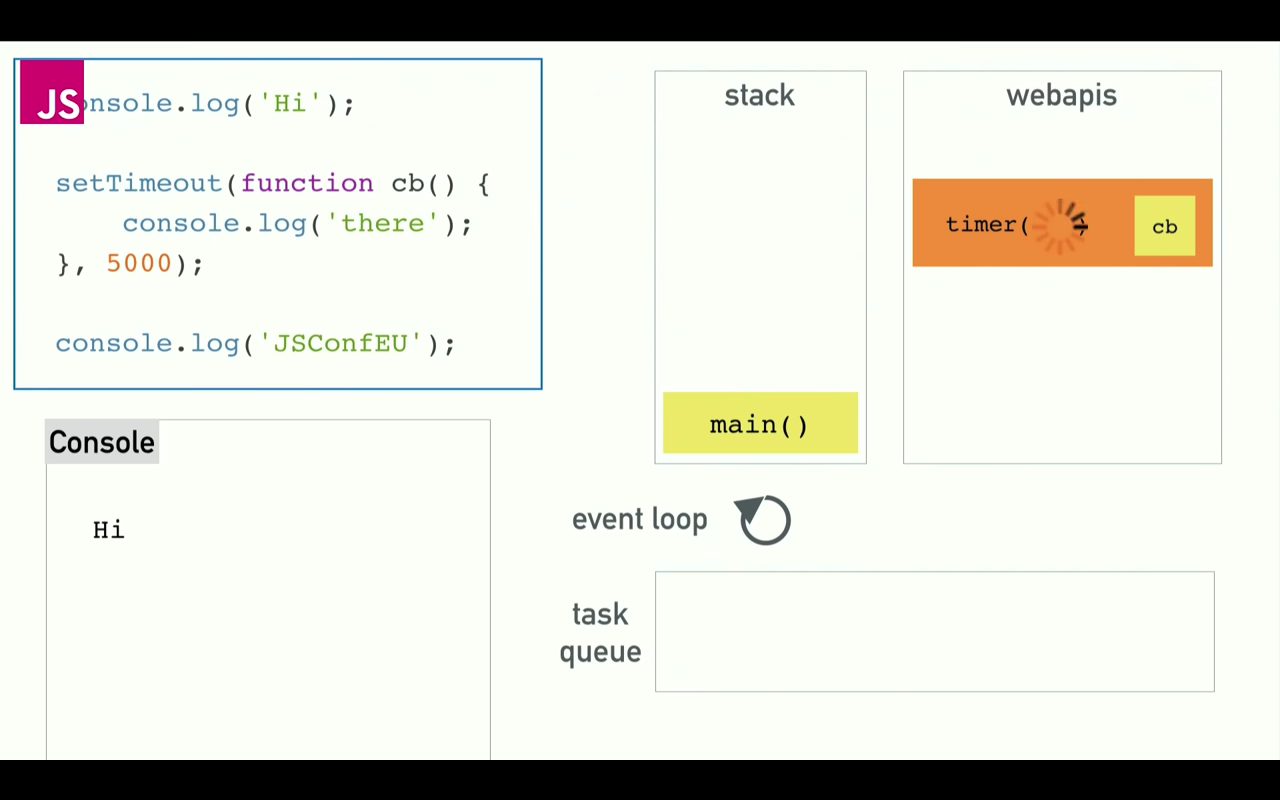
but since it is defined as an async function (you have to tell js that it's async when defining your own function too), it gets passed onto the webapis part of the environment and off the call stack.
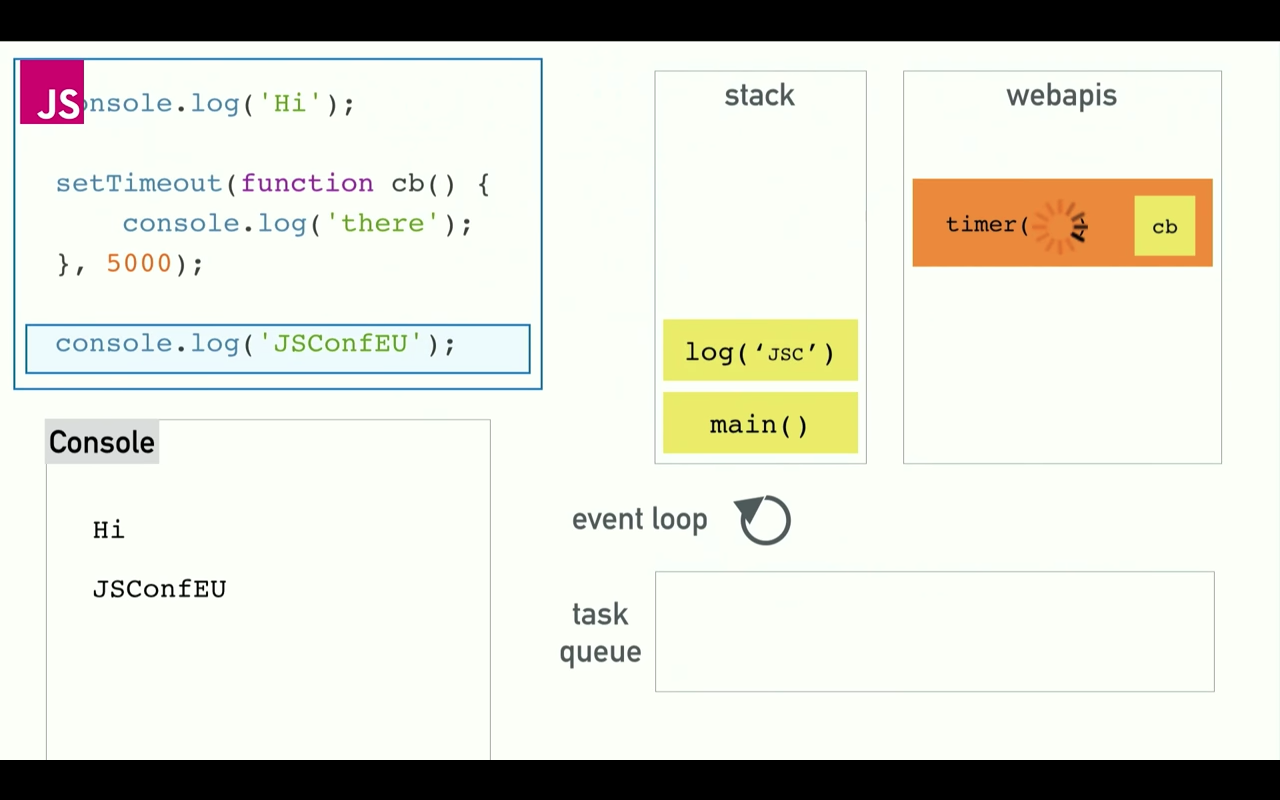
the call stack (remember, it is the JS Runtime which we see) continues stepping through to the next line, executing console.log('JSConfEU'); while webapis is executing setTimeout.
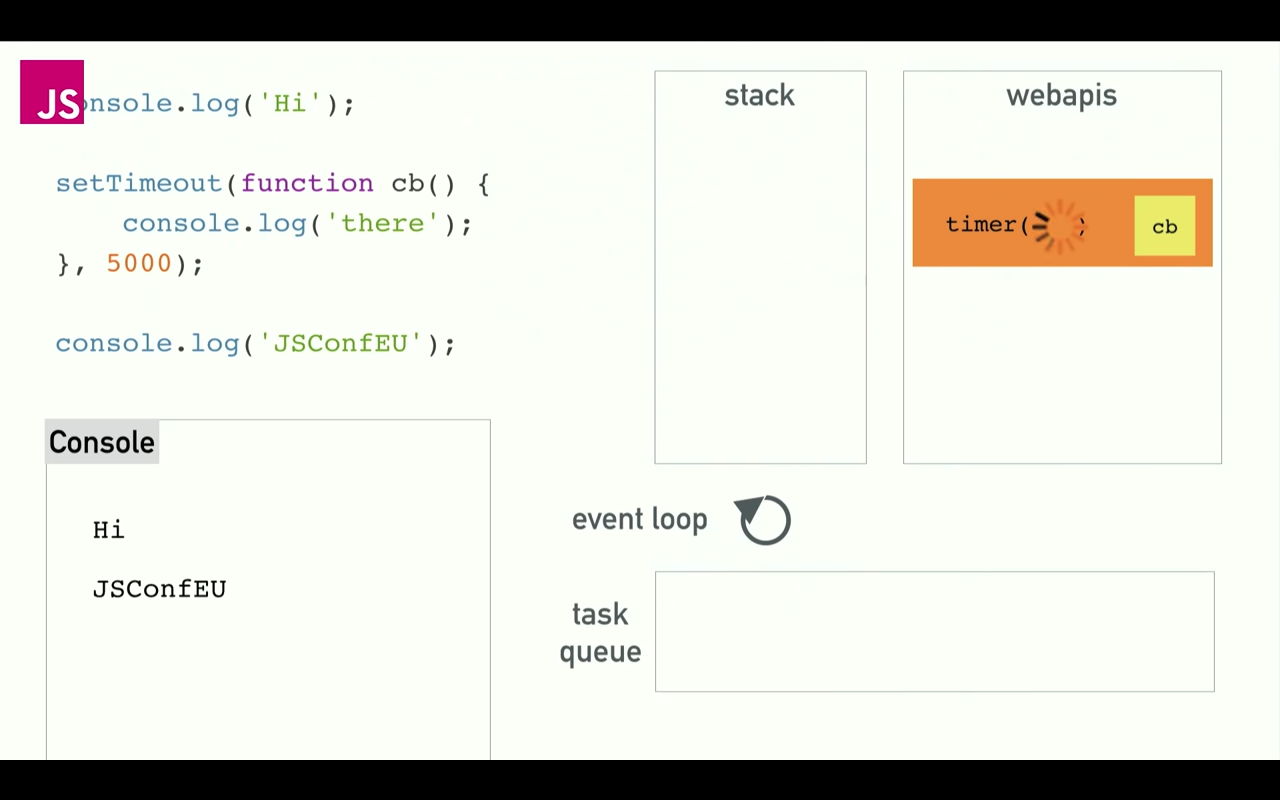
the stack is cleared. setTimeout continues running for however long it is needed.
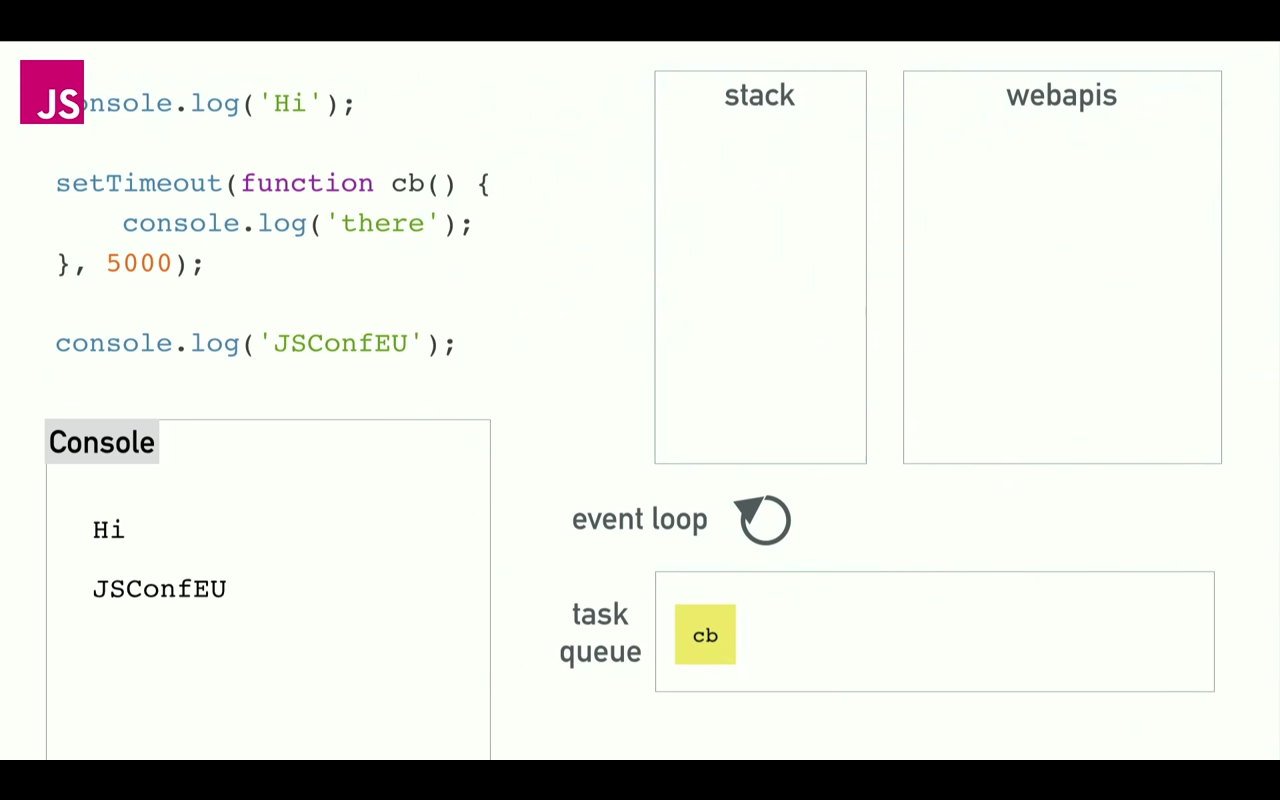
setTimeout is done! the result is passed form webapis to the task queue.
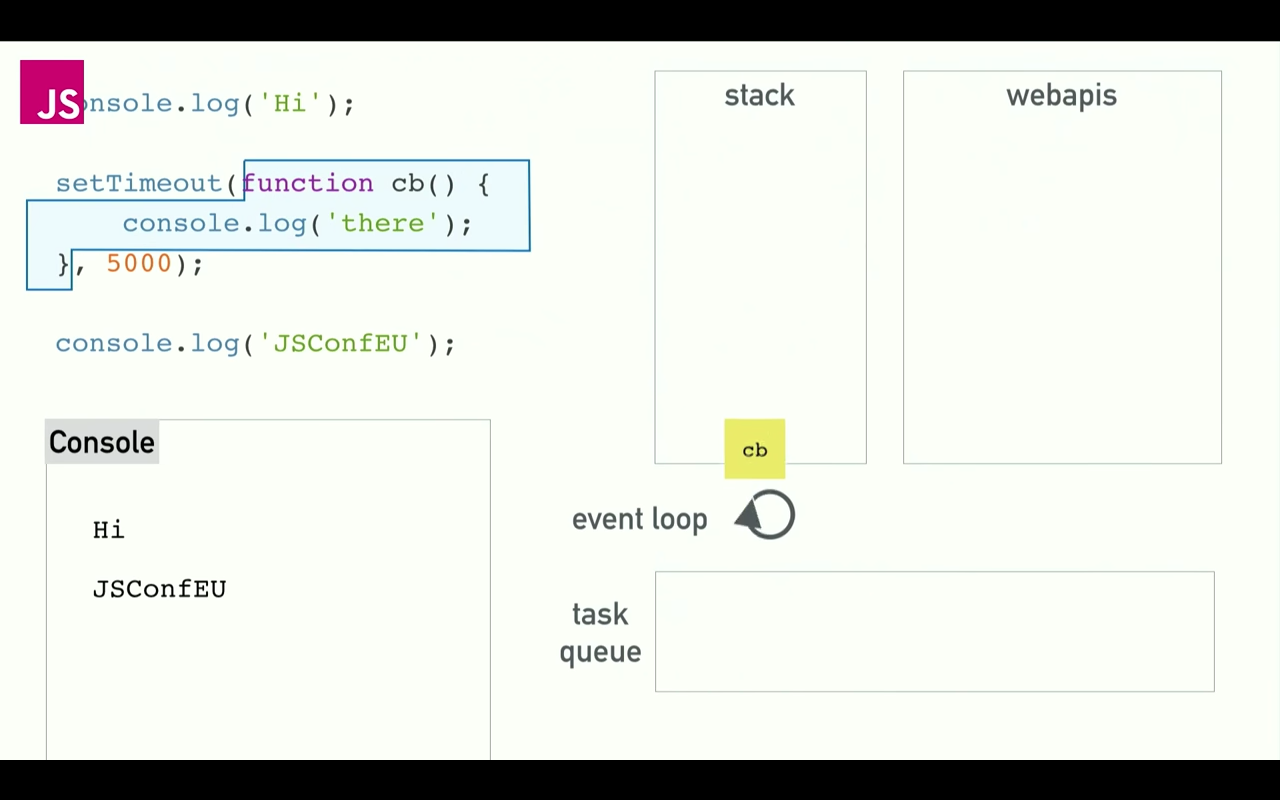
now the event loop as one job: to look at the call stack and look at the task queue. if the call stack is empty, it take the first thing in the task queue and pushes it onto the call stack, letting it return the result of the execution from the async function setTimeout, thereby running it.
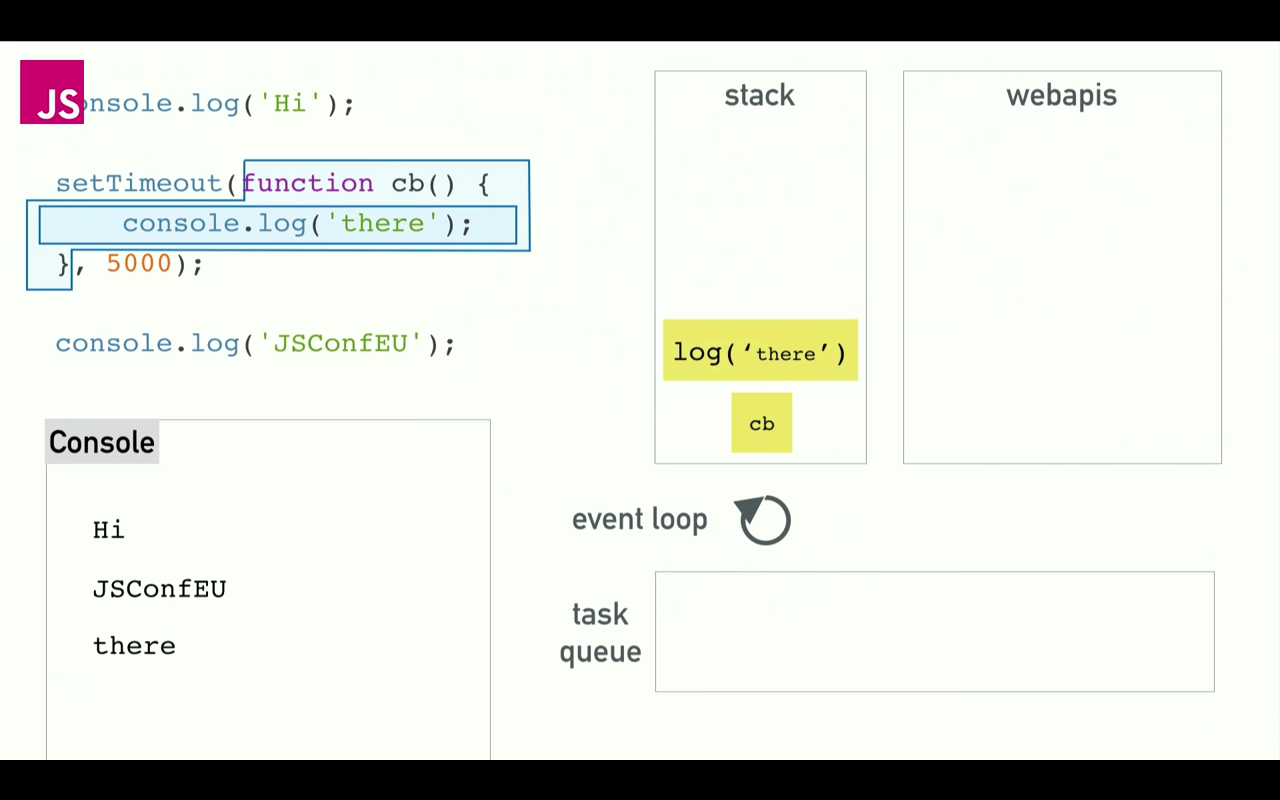
setTimeout performs its function console.log('there'); and it ends.
common examples of people using event loops
deferring execution
to defer execution till the rest of the code is done, using setTimeout(myfunction(){}, 0); (setTimeout with a delay of 0)
- this is because the function wrapped in setTimeout gets thrown into
webapiland while thecall stackcontinues to execute code down the line, and then only return the wrapped function when the entire call stack has been cleared.
other examples
- XHR request (XmlHttpRequest (go to a url and do something))
- forEach-asynchronous : do something (heavy) for each thing in the list asynchronously
the browser is constrained by what you're doing in javascript
- the browser would like to repaint the screen every 16.6ms (60fps), but you're asking it to do something else and slow it down by giving it code
- it can't actually do a render if you have something on the stack (code being executed)
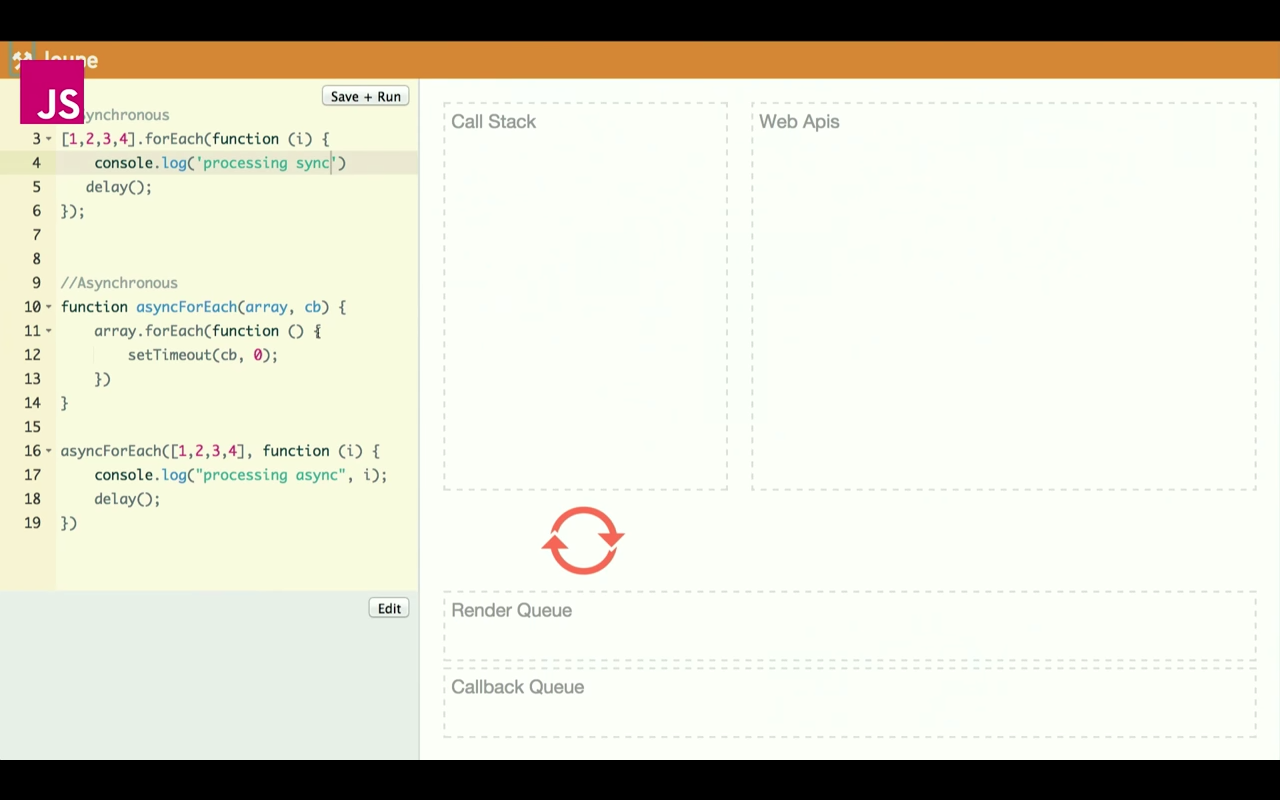
important part: the Render's Queue is higher priority than your Task Queue source
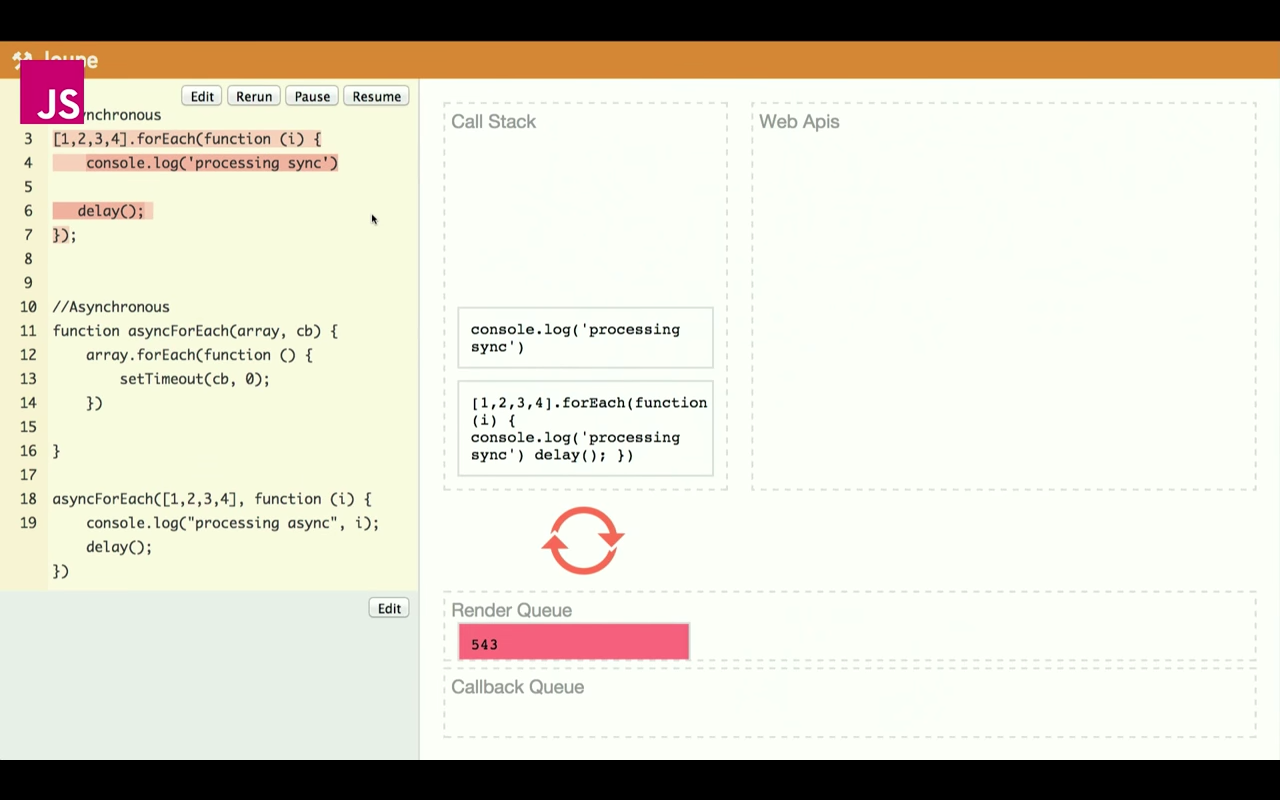
if your task is doing something, the Render Queue is blocked. You can't click anything.
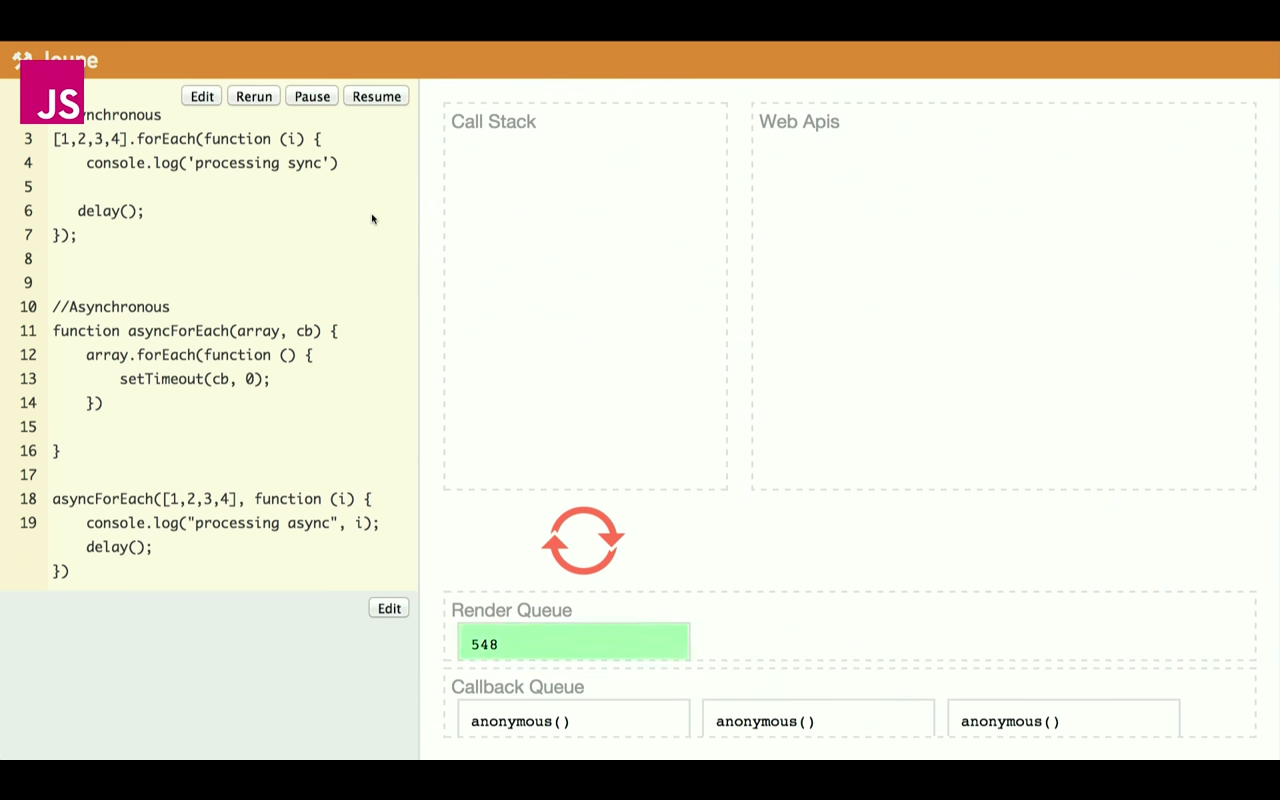
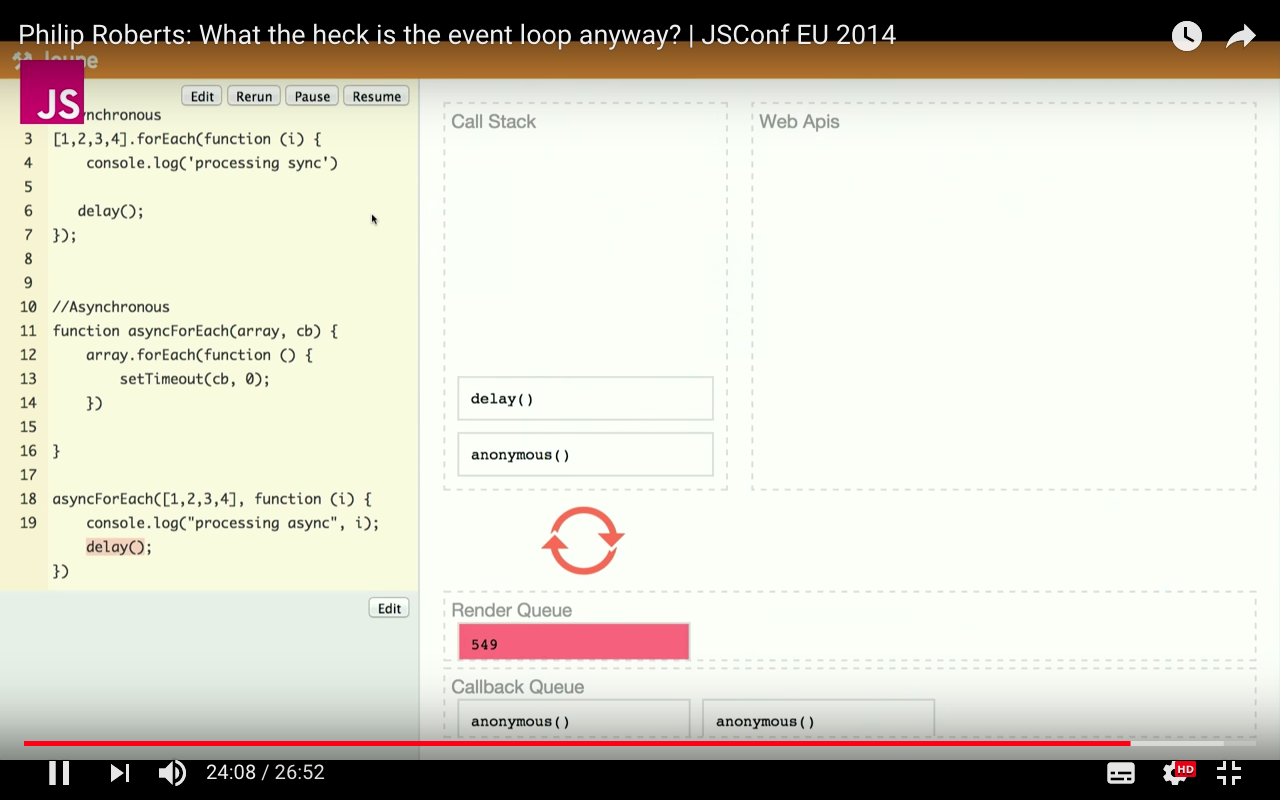
with async functions, you first queue up the async functions wrapped in setTimeout, and then they are run in the webapi and placed back in the callback queue / task queue. this time, Render Queue is allowed to update the frame (render the image) between callback queues so your screen doesn't freeze up.
the heart of Javascript - DOM
- https://www.codecademy.com/articles/react-virtual-dom
- manipulating DOM is slow. most Javascript frameworks also UPDATE THEM MORE THAN THEY NEED TO
- checklist app
- when you tick one item, javascript rebuilds the ENTIRE list
- checklist app
- therefore React popularized something called virtual DOM
Virtual DOM
- more
- in React, for every DOM object, there is a corresponding virtual DOM object. a virtual DOM object is a representation of a DOM object (a lightweight copy)
- exactly same as DOM, but can't change anything on the screen
- manipulating virtual DOM is much faster, like editing a blueprint, vs moving rooms in the entire house (DOM).
- when a JSX element is rendered, every single virtual DOM gets updated, then React compares the virtual DOM with the previuos virtual DOM, like Git, and only updates the changes.
- it is called diffing
Things to Know
- var, let, const
- async/await
- .bind() - binding a method to an object
- prototypes
- inheritance
- promises and callbacks - i placed them below cause we should be using async/await instead
- event listeners
Var, Let, Const
- TLDR: when? 1. don't use
varif possible 2.constfor variables that won't change (immutable) 3.letfor variables that will change - var, let, const
VAR
- put variable declarations on top (good practise)
- assign your variables before using it (because, just because. you know, like python)
- vars are function scoped
- vars are not block scoped (if statements are block scopes)
var i = 0;
if (true) {
  var i = 1;
}
console.log(i); // 1   even if false. whadda hell.
LET
- lets are block scoped!
let i = 0;
if (true) {
  let i = 1;
}
console.log(i); //0   Phew.
CONST
- const is also block scoped
const i = 0;
i = 1; //NOPE

const objThing = {
  i: 0,
};
obj.i = 1; //OK- so
constallows mutability, but disallows variables from changing. - variables = no change allowed - objects and arrays and stuff = allowed
promises
// PROMISES
// --------
// promises (+ async/await)
// https://codeburst.io/javascript-es-2017-learn-async-await-by-example-48acc58bad65
// resolving and rejecting
// https://developer.mozilla.org/en-US/docs/Web/JavaScript/Guide/Using_promises
// promise.all
// https://developer.mozilla.org/en-US/docs/Web/JavaScript/Reference/Global_Objects/Promise/all
// https://stackoverflow.com/questions/33073509/promise-all-then-resolve

// structure of a promises based async function
function functionName(input1, input2) {
  // always returns a promise where inside you do stuff
  // resolve is where you tell Promise when is the time to mark the code as DONE
  return new Promise((resolve) => {
    const a = "hey";
    // do all your code here

    // when you're done, resolve (special return for Promises)
    resolve(a);

    if ("something bad happens") {
      reject("argh i'm dying!!!");
    }
  });
}
async/await
const puppeteer = require("puppeteer");

// async function that can run on as many threads as possible
async function screenshotter(link_in) {
  const screenshot_name = link_in.split("/").slice(-1)[0];
  console.log(screenshot_name);
  const browser = await puppeteer.launch();
  const page = await browser.newPage();
  await page.goto(link_in);
  await page.screenshot({ path: `${screenshot_name}.png` });

  await browser.close();
}

screenshotter("https://developers.google.com/web/tools/puppeteer");
screenshotter(
  "https://stackoverflow.com/questions/3304014/how-to-interpolate-variables-in-strings-in-javascript-without-concatenation"
);
screenshotter("https://stackoverflow.com/questions/3216013/get-the-last-item-in-an-array");
screenshotter("https://alligator.io/tooling/puppeteer");
screenshotter("https://medium.com/jsguru/javascript-async-await-742ddf66c348");
.bind() - binding a method to an object
- an object is (python's class) a thing with properties
- when you want to do two functions that use different parts of an object, you bind them to an object.
- you have an object
myobject(kinda like a dictionary where keys are 'properties' fancy) - you have two functions that need to use that object
fullnamerdetailer - you
.bind()the objectmyobjectto bothfullnameranddetailerwithvar newFunctionName = originalFunctionName.bind(objectName); - now when you call
newFunctionNameyou run the function using properties from the object - e.g. below:
var person = {
  firstName: "John",
  lastName: "Smith",
  age: 23,
};

function printFullName() {
  console.log(this.firstName + " " + this.lastName);
}

function printDetails() {
  console.log(this.firstName + " is " + this.age + " years old");
}

// TODO: create bound copies of printFullName and printDetails.
var boundPrintFullName = printFullName.bind(person);
var boundPrintDetails = printDetails.bind(person);

boundPrintFullName(); //prints : John Smith
boundPrintDetails(); //prints : John is 23 years old
prototype property
- all functions come with a .prototype
var thing = function() {};makes an object (class in py) and does nothing. - if you then callthing.prototype.height = 15, then thethinghas a height property of 15.- you call it with
var Vase = new thing();and then when you callVase.heightyou get a 15. - of course, gotta console.log to see it.
- if you do
thing.prototype.weight = function(water_amount, flowers_amount) {
    this.water = water_amount;
    this.flowers = flowers_amount;

    return (this.water * 0.1) + (this.flowers * 5)
}- you get a weight method (same in python, a method is a function/definition inside a class/object) that takes in two inputs.
- when you run it with
Vase.weight(10, 5)you get a value.
inheritance (read prototype first)
var Person = function () {};

Person.prototype.initialize = function (name, age) {
  this.name = name;
  this.age = age;
};

Person.prototype.describe = function () {
  return this.name + ", " + this.age + " years old.";
};

var Student = function () {};
Student.prototype = new Person();
// THIS HERE ABOVE is the fancy part called INHERITANCE

Student.prototype.learn = function (subject) {
  console.log(this.name + " just learned " + subject);
};

var me = new Student();

me.initialize("John", 25);
me.learn("Inheritance");
Promises, callbacks
dude who implemented promises explains well / reader promises sequence viewer (viz tool)
You know when you have to make a function in a function in a function in function to make sure all the callbacks collapse back in the right order? edit: it's called 'callback hell'.
NOW YOU DON'T HAVE TO.
before
getTweetsFor("domenic", function (err, results) {
  // the rest of your code goes here.
});
after
var promiseForTweets = getTweetsFor("domenic");
// holy shit this is async but it looks exactly the same as sync
or
runFunction().then(successFunc, failureFunc);
// the above runFunction() returns a promise
Promises
- allows us to wait on certain code to finish execution before running the next bit of code.
Think about a website that loads data from an API then processes and formats the data to display to the user. If we try to process and format our data before the API has even fetched the information, we’re either going to get an error or a blank website. By using a Promise, we can ensure that the API data isn’t processed/formatted until after our API call has succeeded.
- a Promise represents a, eventual result of an asynchronous operation.
- like a placeholder where you can attach callbacks.
Promises can have 3 states
- Pending - async operation has not completed yet
- Fulfilled - operation has completed, Promise has a value
- Rejected - operation has completed, error or failed
A promise is <strong>settled</strong> if it is not pending. Once a Promise has settled, it is settled for good. It cannot transition to any other state.
from here:
as of present day Javascript, async code looks almost like sync code
In other words, the following asynchronous code:
getTweetsFor("domenic") // promise-returning function
  .then(function (tweets) {
    var shortUrls = parseTweetsForUrls(tweets);
    var mostRecentShortUrl = shortUrls[0];
    return expandUrlUsingTwitterApi(mostRecentShortUrl); // promise-returning function
  })
  .then(httpGet) // promise-returning function
  .then(
    function (responseBody) {
      console.log("Most recent link text:", responseBody);
    },
    function (error) {
      console.error("Error with the twitterverse:", error);
    }
  );
parallels the synchronous code:
try {
  var tweets = getTweetsFor("domenic"); // blocking
  var shortUrls = parseTweetsForUrls(tweets);
  var mostRecentShortUrl = shortUrls[0];
  var responseBody = httpGet(expandUrlUsingTwitterApi(mostRecentShortUrl)); // blocking x 2
  console.log("Most recent link text:", responseBody);
} catch (error) {
  console.error("Error with the twitterverse: ", error);
}
Note in particular how errors flowed from any step in the process to our catch handler, without explicit by-hand bubbling code. And with the upcoming ECMAScript 6 revision of JavaScript, plus some party tricks, the code becomes not only parallel but almost identical.
Event Listeners
<script>
    const input = document.querySelector("input")
    const example = document.querySelector("#example")

    /*
    event listener is added to the thing in html
    which is the input tag, and it listens for 'change'
    as defined in the link above
    when the listener detects 'change', it takes what
    comes out of the input and sets the
    example.style.background to e.target.value
    */

    input.addEventListener("change", (e) => {
        // points to the css
        example.style.background = e.target.value;
    })
</script>
immutability and why it is important
There are generally two ways for changing data. The first method is to mutate the data by directly changing the values of a variable. The second method is to replace the data with a new copy of the object that also includes desired changes.
benefits
- easier undo/redo and time travel
- tracking changes (like git)
- determinining when to re-render in React
SOME BATSHIT CONVENIENCE FUNCTIONS
Conditional Operators
hsb.s = max != 0 ? 255 * delta / max : 0;
wha?
It is called the Conditional Operator (which is a ternary operator).
It has the form of: condition ? value-if-true : value-if-false
Think of the ? as "then" and : as "else".
Your code is equivalent to:
if (max != 0)
  hsb.s = 255 * delta / max;
else
  hsb.s = 0;
Short form If else
(condition) ? expression on true : expression on false
const result = (10 < 5) ? "cat" : "dog"
Short Circuit Operations
Short form conditionals && and || when used in one line without =,
becomes a short-circuit operation
thing > 5 && "quesadilla";
// if thing is more than 5, the code in the bracket becomes 'quesadilla'
// otherwise it becomes nothing!
Arrow Functions (ES6)
- works like python's lambda function
//before
var a2 = a.map(function (s) {
  return s.length;
});

// after
var a2 = a.map((s) => s.length);
fancy AF
string with variables
OTHERS
- learn javascript through rapydscript? It's like python so its cheating a bit.
- nice gitbook javascript ebook
- actually learn javascript source2 recommended source
DONE
things to know (vs python)
- javascript is an ASYNCHRONOUS programming language - callback functions are a big thing. - things like error handling are a Pain In The Ass (PITA) because its hard to find out which method went wrong at what time (because they don't follow an order)
- C# and F# is also asynchronous (but they have design patterns called 'async/wait' which make it easier apparently)
- to deal with it properly, learn how to use
promiseorfutureortask- with JQuery, use$.Deferred()- with AngularJS, use$q.defer()
cool new things (vs python)
alert() // make a pop up that you can close confirm() // makes a yes/no popup
javascript (coming from python)
slight differences
- add semicolons ;
- add {} for stuff inside definitions
- definitions are functions def -> function
things to watch out for
- empty arrays and empty objects aren't false
python -> javascript
def myfunc(): code -> function myfunc() { code }
list() -> Array
dict -> Objects (they are everywhere)
input() -> prompt()
print() -> console.log()
== -> ===
// below is for strings
"li qun"[1:3] -> "li qun".substring(1, 3)
// below is for arrays (lists)
['a', 'b', 'c', 'd', 'e'][1:3] -> ['a', 'b', 'c', 'd', 'e'].slice(2, 3)
javascript history
- https://codeburst.io/javascript-wtf-is-es6-es8-es-2017-ecmascript-dca859e4821c Here’s what happened long, long ago:
- JavaScript was originally named JavaScript in hopes of capitalizing on the success of Java.
- Netscape then submitted JavaScript to ECMA International for Standardization. (ECMA is an organization that standardizes information)
- This results in a new language standard, known as ECMAScript.
- Put simply, ECMAScript is a standard. While JavaScript is the most popular implementation of that standard. JavaScript implements ECMAScript and builds on top of it.
useful things
- progress bars https://docs.travis-ci.com/api#overview
- simple progress bar https://github.com/fehmicansaglam/progressed.io
- other charts http://luizperes.github.io/status-projects/
- ejs package is like jinja2, expressJS templating engine - for hairy things like running dynamic code on html
how to run javascript
- on the browser - use the browser - quora 1. use jsbin 2. save the file as .HTML, .HTM and open in google chrome, right click, inspect element, and click console. You should be able to see the results of your code running.
- off the browser - use node.js - in terminal: node myapp.js
NODEJS
just like when you do python myapp.py in terminal, now you can do node myapp.js in terminal.
apparently you couldn't before.
- a lightweight server that allows you to run Javascript outside the browser
- perform actions on your local machine
- has the ability to run HTTP applications written in Javascript - essentially doing what Apache httpd does (meaning Node.js acts like a webserver)
- meaning, there are now applications using Javascript to run front end AND backend.
- but Node is single threaded, so its not super fast
The main advantage is the asynchronous nature of the language, which is caused by the single-threaded event-loop, which is a fancy way of saying "I can schedule a bunch of jobs simultaneously, and I'll be able to answer them as soon as they are done processing - no job that is done will have to wait around for me to get around to it because I'll know instantly".command cheat sheet
console.log() and cousins (like print() in python)
- 4 ways to display data, by writing into:
- html element - innerHTML
- ask javascript to find the element
- html output - document.write()
- alert box (pop up in browser) - window.alert()
- browser console - console.log()
load html (the final output usually) when working in js
callback functions
It's like calling a business on the phone and leaving your "callback" number, so they can call you when someone is available to get back to you. That's better than hanging on the line for who knows how long and not being able to attend to other affairs. A callback function is a function which is:
passed as an argument to another function, and,
is invoked after some kind of event.Consider how programmers normally write to a file: (LQ: like python)
    fileObject = open(file)
    # now that we have WAITED for the file to open, we can write to it
    fileObject.write("We are writing to the file.")
    # now we can continue doing the other, totally unrelated things our program does
Here, we WAIT for the file to open, before we write to it. This "blocks" the flow of execution, and our program cannot do any of the other things it might need to do! What if we could do this instead:
    # we pass writeToFile (A CALLBACK FUNCTION!) to the open function
    fileObject = open(file, writeToFile)
    # execution continues flowing -- we don't wait for the file to be opened
    # ONCE the file is opened we write to it, but while we wait WE CAN DO OTHER THINGS!
It turns out we do this with some languages and frameworks. It's pretty cool! Check out Node.js to get some real practice with this kind of thinking.