Same Site cookies
update: Laravel's better explanation: https://laravel.com/docs/8.x/csrf#csrf-explanation
cookies are one way to add 'state' to sites, so that we can preserve state across refreshes and days / user sessions.
each cookie is a key-value pair.
servers set cookies to the browser by sending the 'Set-Cookie' header
- e.g.
Set-Cookie: promo_shown=1; Max-Age=2600000; Secure
whenever the user views a page on the browser meets the requirements (less than a month old, and on a secure connection, i.e. HTTPS), the browser will send promo_shown=1 in its request to the server in a header
- e.g.
Cookie: promo_shown=1
additionally, you can also access the cookie on javascript with document.cookie
js can also set document cookies by assigning them to document.cookie using the same format as the 'Set-Cookie' header.
- e.g.
document.cookie = "promo_shown=1; Max-Age=2600000; Secure"
relative to the user (on the browser), there are two types of cookies:
- first-party cookies: same domain as what's displayed on the user's address bar
- third-party cookies: cookies from a different domain (other website's state)
first party cookies are the state for your website when the user is browsing it
third party cookies act like other website's state that is used on your website. How does this work? what do other websites want to remember on your website?
youtube, for example, stores a user session (logged in session) in a cookie. when a user browses your website that has an embedded youtube player for example, the user can click watch later and youtube will know who wants to 'watch this video later' (meaning he won't have to sign in to youtube again)
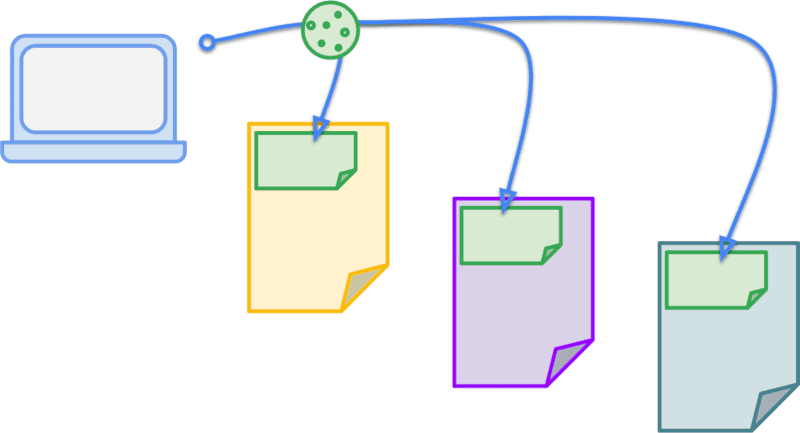
the below image is quite mind-blowing to me when i first saw it: you can store your website's state in other websites! in the image, the green cookie is your cookie, and is being used on other websites.
this can be a problem though. (which is why i'm learning up same site cookies). If the same user of your website visits evil.com, the malicious website can ALSO trigger requests to your-website.com, and the user's browser will happily attach the associated cookies. if your website does not validate those requests, it could trigger actions like deleting posts, adding content, or even charging the user money.
third party cookies can also be used to track their activity across multiple sites.
however, until the SameSite attribute was introduced, you had no control on how you wanted your cookies to be used.
for example, if your website has a cookie called promo_shown to check if the user has seen the very distracting promo banner on your website, and
in essence, you are forced to share your website state, whether you like it or not, to other websites when they link to your content. if you had an amazing_dog.png image that is hosted on your-website.com/blog/images/amazing_dog.png, and it went viral, other people would link to your image of the amazing dog on their sites. Then, if there are users who have visited your website before (and therefore have the promo_shown cookie on their browser) view the amazing dog image on other websites (like e.g. japantimes or new york times), the user's browser will be sending you promo_shown cookie when requesting the image, whether you like it or not.
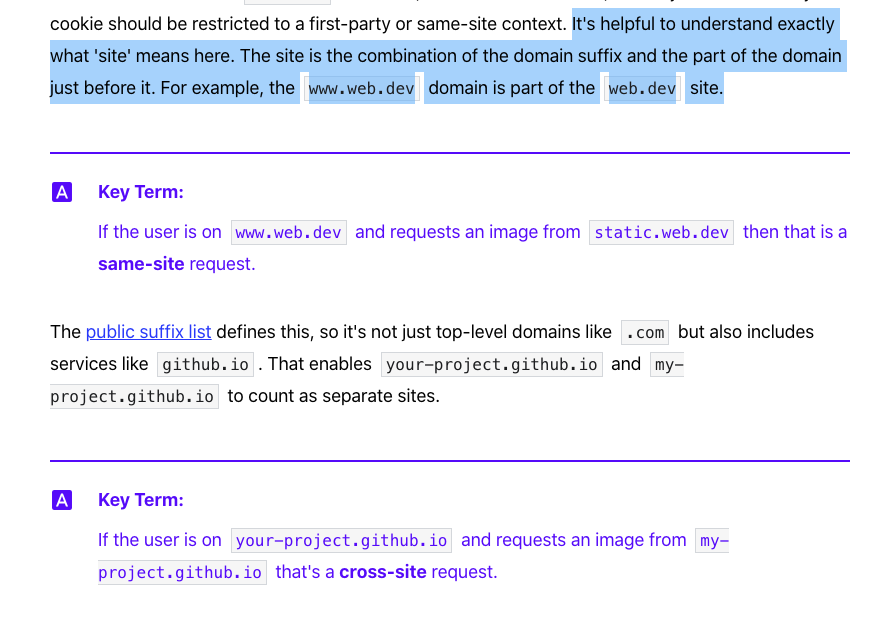
the new attribute is called SameSite, and allows you to tell the browsers whether a cookie is first-party (same-site) or not. it is important to know what same site means here.
in summary, DOES samesite attribute on cookies prevent all CSRF attacks? no.
this means now you have a big switch to say:
- 'this cookie is used in my website only, i don't need to share it (SameSite="Strict")', or
- 'this cookie is used to maintain my user session, and i want to share it (SameSite="None", Secure)', or even
- 'this cookie is ok to share when sharing top level links (the main url, e.g. 'your-website.com/blog/2322'), because i don't want the user to re-login every time he clicks on a shared link to my blog (SameSite="Lax")
the main reason why SameSite cookies is introduced though, is to help protect against CSRF (Cross Site Request Forgery) attacks.
Guessing through the name gets us close enough to understanding what it means. Cross Site Request Forgery means an attacker can fake a request to a website, using someone else's cookie to pretend that they are the user. They do this when sending request from their own website (e.g. 'evil.com'), therefore it is across different sites (Cross Site).
CSRF attacks can be reduced when you can control which cookies are allowed to be shared.
- your dog image can have tracking cookies from your website if you want to know how many people have seen your dog.
- but your user login cookie should NOT be shared by default. if you want to keep the user session when another user clicks a link to your website while he's logged in, you can do that (SameSite=Lax)
- your form submission cookies like payment or ecommerce cookies should definitely never be shared no matter what (SameSite=Strict)
ref
https://web.dev/samesite-cookies-explained/ http://www.sjoerdlangkemper.nl/2016/04/14/preventing-csrf-with-samesite-cookie-attribute/ https://portswigger.net/web-security/csrf/samesite-cookies#:~:text=Some%20web%20sites%20defend%20against,submitted%20in%20cross%2Dsite%20requests https://security.stackexchange.com/questions/23371/csrf-protection-with-custom-headers-and-without-validating-token https://security.stackexchange.com/questions/166724/should-i-use-csrf-protection-on-rest-api-endpoints https://security.stackexchange.com/questions/121971/will-same-site-cookies-be-sufficent-protection-against-csrf-and-xss CSRF on SPA