Consistent Hashing
Problem:
- your database is full, your db system needs to scale up.
- your database needs to be partitioned.
How do you partition your database? there are 3 ways to partition your data depending on how you structure your stuff (read more here).
Today we will be talking about just one: horizontal partitioning.
so for example your database (that is currently full) is a nosql document database. you have outgrown the number of rows that one collection can support, and you need more.
There are two ways to perform this split.
- range based partitioning - split the rows of your table by something (can be by alphabet, can be by some number range etc)
- hash based partioning - generate 'database indexes' for your rows using a hash function, and send your data to those databases
We will talk about hash based partitioning (because i'm still trying to get to the subject of consistent hashing). This works by taking, say, a unique value from your row (e.g. user id, or some other unique value), and mapping it into a number by running it through a function (hash function).
// mutable
function hashFunction(url) {
    let total = 0;
    for (let i=0, i < url.length, i++) {
        // url = "Mia"
        const character = url[i]; // "M"
        const ascii = character.charCodeAt(0); // 77
        total += ascii;
    }
    // some magic using ascii map
    return total;
}

// immutable
function hashFunction2(url) {
    // .map .filter .reduce
    return url.reduce((current, total, index) => {
        const character = url[index]; // "M"
        const ascii = character.charCodeAt(0); // 77
        return total + ascii
    }, 0)
}

const sample = "Mia";
hashFunction(sample); // 297
http://tinyurl.com/tangliqun_5673 --> hashFunction() --> 3
// store
const hashNum = hashFunction('http://tinyurl.com/tangliqun_5673') // 3
const objectToStore = {
  url: 'http://tinyurl.com/tangliqun_5673',
  fullURL: 'http://google.com',
}
const database = [
undefined,
undefined,
undefined,
objectToStore,
undefined,
undefined,
undefined,
undefined,
]
database.forEach(obj => {
if (obj.url === 'http://tinyurl.com/tangliqun_5673') return 'i found it'
})
// ----------------
// finding a url
// ----------------
// 1. user gives me "http://tinyurl.com/tangliqun_5673"
// 2. i run the url through a hash function and get 3
const hashNum = hashFunction('http://tinyurl.com/tangliqun_5673') // 3
// "http://tinyurl.com/tangliqun_5673" === 3
// 3. i look at the database at item 3
const mySearchData = database[3]
// 4, i return the fullURL to user
const toUser = mySearchData.fullURLthis hash function MUST always return the same mapping given the same value.
Some key properties of the hash function used in Hash based partitioning:
- Our hashing function will randomly distribute URLs into different partitions
- with a good hashing function, it will distribute it in an even distribution (random, even distribution)
- the hash function MUST be a pure function. It must always provide the same output when given the same input (because we need it to find the index the next time we access the data)
- the hashing function turns the input into a number of a range defined by you (e.g. [1 to 256])
we now have a number, which we can use to direct your data to an allocated database.
- say your hash function generates numbers from 1-10, and you have 10 databases
- your data is randomly assigned to one of the databases by the hash function
- you've now successfully partitioned your database into 10 databases!!
only now you're stuck with 10 databases, no more, no less. BECAUSE your hash function only returns numbers 1-10, if you add a database called 'database 11', nothing will ever be sent there, because the index doesn't get generated! What do you do? you seriously shouldn't consider rehashing ALL YOUR DATA into numbers 1-11 and then generate all hash mappings again!
This is where consistent hasing (finally) comes in. a good way to think about it is to imagine a circle, upon which your databases sit in evenly spaced distances.
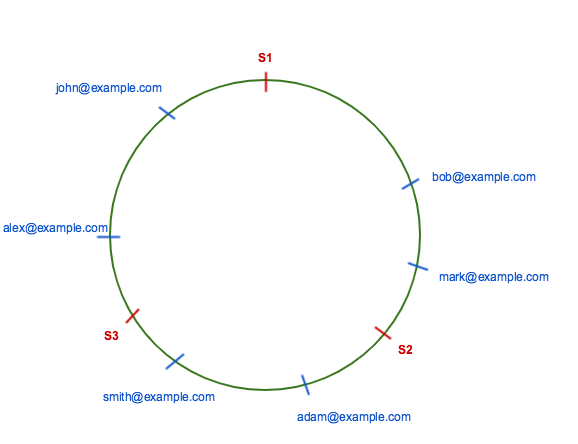
In Consistent Hashing, when the hash table is resized (e.g. a new cache host is added to the system), only ‘k/n’ keys need to be remapped where ‘k’ is the total number of keys and ‘n’ is the total number of servers. Recall that in a caching system using the ‘mod’ as the hash function, all keys need to be remapped.
so now instead of remapping 10 databases worth of data, we plan ahead:
- we generate keys with a larger range, say 200 keys.
- Then we divide that number by the number of databases we have. in our case that's 10, meaning 20 keys per database.
- keys 1-10 go to database 1, keys 11-20 go to database 2, etc.
- when we then need to enlarge our database, we only need to remap 200/10 keys = 20 keys! that's 1/10th the work we would need if we had to remap our entire system's data.
how it works with an additional database:
- imagine we need to add 1 database to our cluster of 10 databases.
- pick a section of keys to split, any would do. let's pick keys 11-20. all other keys will NOT be affected.
- so we add database 11 in between database 1 and database 2
- now, we split the amount of keys each database has to handle. instead of 11-20, now database 11 handles 11-15, and database 2 handles 16-20.
- celebrate!
- this means our system can now scale to 200 databases! (or to be safe, get a larger range, so that you can scale up to, say, 1000 databases)